Hosting

Our hosting solutions are engineered for powerful and reliable performance online. From shared and dedicated hosting to SSL certificates and web security and backup, you can rely on our solutions to provide 99.5% uptime and availability whenever, wherever!

Technical Support

Our IT specialists provide your business with solutions to help with common software and hardware issues across all devices whether on desktop, laptop, or on mobile.

Digital Marketing

Expand your reach online, and efficiently hit business objectives by implementing strategic digital marketing campaigns.

Web

In this digital age, a well-designed website is a game changer. But "well-designed" doesn't just mean aesthetics, but overall user experience. We create highly-functional websites that can support your business objectives -- whether that means driving awareness, lead generation, or even sales.

How Can We Help?
< All Topics
Print

How to export a database using cPanel phpMyAdmin

Overview

To export your database, you will need to open your databases via phpMyAdmin first.

On phpMyAdmin select your desired database and press Export:
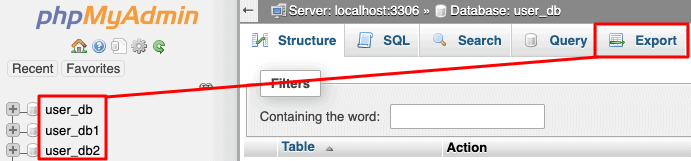
If you want to simply export to SQL file (SQL file is everything you need when moving databases), just click on Go:


Also, if you wish to set special requirements, you can change the format or choose to export only some tables from your database:

That’s it! Click Go your database will be downloaded to your computer.

Table of Contents

Let's work together!


Make the first move! Let iManila help you maximize your presence online.

Just fill out your contact details and tell us what you need, then we’ll be sure to get back to you as soon as possible.