


cPanel Tutorials – How to Work with MySQL Databases
Our IT specialists provide your business with solutions to help with common software and hardware issues across all devices whether on desktop, laptop, or on mobile.
Expand your reach online, and efficiently hit business objectives by implementing strategic digital marketing campaigns.
In this digital age, a well-designed website is a game changer. But "well-designed" doesn't just mean aesthetics, but overall user experience. We create highly-functional websites that can support your business objectives -- whether that means driving awareness, lead generation, or even sales.
To import your database, you will need to open it via phpMyAdmin first.
On phpMyAdmin all you will need to do is select your desired database and to press Import:

Choose a file which is .sql or .sql.zip format:

Proceed further without changing anything on the settings and click Go.
When importing a database make sure your file’s format is .sql, you can also import a compressed .sql file with these compression types: gzip, bzip2, zip (for example, file.sql.zip). This error might also indicate a corrupted database file.
If you see this error, it means that your database user doesn’t have enough permissions to import the database. To fix it,open MySQL Databases -> Your user -> Manage user privileges. Make sure that permissions are set correctly (by default all checkmarks should be added):

This error means that your database includes queries that require SUPER privileges to be executed. In this case, double-check your .sql file if such queries can be removed. After you remove them through any text editor of your choice, importing the database will be possible.
If they are required, you may consider going for one of our Cloud Hosting Plans.
The phpMyAdmin is a third-party tool to manage tables and data inside a database. It is graphical user interface to manage MySQL databases. You can manually create Tables, Import and Export data or edit the values of a row through it.
Click on the phpMyAdmin link, which can be found under the databases section of cPanel Home.

You will see a dashboard similar to this.

On the left-hand pane, there is a list of databases, which can be expended to see the table in each database. On the right hand pane, there is general information of Database server.
To export your database, you will need to open your databases via phpMyAdmin first.
On phpMyAdmin select your desired database and press Export:
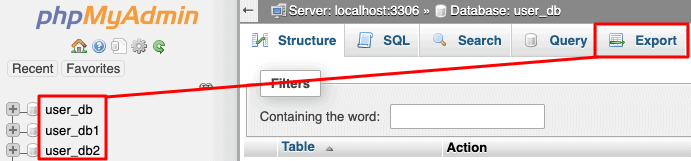
If you want to simply export to SQL file (SQL file is everything you need when moving databases), just click on Go:

Also, if you wish to set special requirements, you can change the format or choose to export only some tables from your database:

That’s it! Click Go your database will be downloaded to your computer.

Get 99.5% uptime and availability from one
of the top hosting providers in the country.

Giving you the control and the
dedicated resources that your business needs.
Get 99.5% uptime and availability from one
of the top hosting providers in the country.
Giving you the control and the
dedicated resources that your business needs.
Get 99.5% uptime and availability from one
of the top hosting providers in the country.


You must be logged in to post a comment.